How to analyze screencaps properly:
Contrast Boosting:
Contrast boosting can be seen as a loss of detail in white areas.


The second cap looks better, but it's not. The contrast boosting makes some of the curtains disappear.
Combing:
Combing comes from viewing interlaced transfers on progressive displays (PC monitors or Videoprojectors).
It can be seen as thin black lines, only visible during motion.


This sort of comparison is quite unfair, since these lines won't appear at all on your display, as most displays can make them disappear using various deinterlacing modes.
Edge Enhancement:
EE is a filter that is applied on a transfer to make it look sharper on smaller screens.
It doesn't create any detail. Just the illusion of sharpness.
EE can be seen as a white halo surrounding the edge of sharp objects.
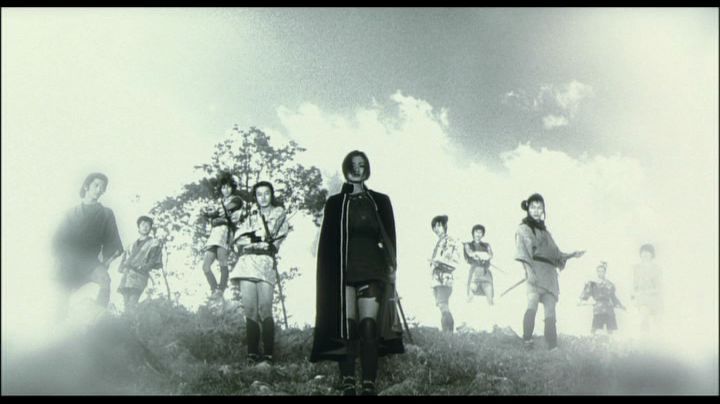

The second cap looks sharper but it's not.
Both caps feature the exact same amount of detail.
Note the big white halos surrounding Aya's cape.
What is interlaced ?
What is progressive ?
Film is shot at 24 full frames per second.
Those frames are called progressive.
TVs display 60 half-frames per second in the US.
They display 50 half-frames per second in the UK.
These displays are called "interlaced displays".
An interlaced picture looks like this:

Those thin black bars are called "combing".
You see combing because your monitor is displaying two half-frames.
What about DVDs, now ?
DVDs can be either:
-progressive (24 full frames per second).
-interlaced (60 half frames per second).
How to recognize an interlaced DVD on your PC ?
If you're using PowerDVD, you need to deactivate deinterlacing.
(Configuration -> Video -> Advanced, I think).
Then, play a bit of the film (scenes with fast motion, preferably).
If you see this:

Then the DVD is progressive.
If you see this:
Then the DVD is interlaced.
Progressive DVDs are always better, because in order to remove the combing, you need to use deinterlacing. And deinterlacing can produce "ghosting", like this:

In some rare cases, ghosting can be seen even when Deinterlacing is deactivated.
It means that the ghosting comes from the transfer itself (poorly done NTSC -> PAL conversion for example).
Note:
I know that some of the info above is inaccurate. I've simplified it on purpose to make it easier to understand.
Horizontal and Vertical stretching:
Most of the time, the horizontal stretching of a transfer is a direct result of cropping.
If you crop the sides by 6%, you have to stretch the picture by 6% to keep the aspect ratio.


First cap is cropped and stretched. Second cap isn't.
Vertical stretching is quite rare.
You can find it on HKL's Magnificent Butcher, and on several korean DVDs (they sometimes stretch 1:85 transfers to 1:778 instead of cropping them).
I used to be "the man who loves the movies you hate".
Now I'm just "that weird french guy with a cat avatar who comes to BnB once a year for no reason and then disappears again".