PostNuke problem...

Literally. Unless it Should Go Elsewhere
User avatar
thelostdragon
Bruce Lee's Fist
Posts: 7059
Joined: 29 Oct 2004, 22:36
Location: Basin City

PostNuke problem...

Post by thelostdragon »

Hey,

is anybody here knowledgable in terms of PostNuke and PHP? Man, my website has been hacked. Check out http://www.hongkonglegends.net

Here is the post I posted at the support forum of postnuke.com.

Mordib, maybe you have an idea of what can be done here?
Hey,

I have a similar problem as pdilella, but definitely caused by the same guy.

If you go to my site at http://www.hongkonglegends.net you get this message:
Fatal Error !!! bY:Dominic - contact: dominic_ferror@yahoo.com.br
ADONewConnection: Unable to load database driver ''


Fatal error: Call to a member function on a non-object in /export/home/thelostd/www/includes/pnAPI.php on line 428

Line 428 says the following:
$dbh =& $GLOBALS['pndbconn']->Connect($dbhost, $dbuname, $dbpass, $dbname);
Any idea what I can do now to solve this problem? I'm on .750.

My site has been running for a year only and I am not that knowledgable in terms of PHP and MySQL. I was lucky to had someone who helped me getting the site online. I never made backups of the site, but in case I have to re-install the whole thing, is it possible to get the content of the site back? I had many movie and DVD reviews on my site.

Any kind of help is welcome.

Thanks.
Last edited by thelostdragon on 11 Dec 2005, 13:10, edited 1 time in total.
Image
slasher13
Royal Tramp
Posts: 1799
Joined: 03 Dec 2004, 09:15

Post by slasher13 »

Salaam Lostdragon,

I would check to see if your mysql database is up and running. I've had in the past, then for somereason the hosting company had switched it off, results in an error. The error you are getting "ADONewConnection: Unable to load database driver '' sounds like its not communting with the mysql database. Please get your hosting company to check this.

Kind Regards
User avatar
thelostdragon
Bruce Lee's Fist
Posts: 7059
Joined: 29 Oct 2004, 22:36
Location: Basin City

Post by thelostdragon »

Salaam Slasher,

thanks for your help. How do I check if the mysql database is running.

I tried to check out the logs in my webspace to find out how the guy got into my site. However, the access was denied to this directory. D'oh.

I followed your advice and contacted my hosting company. Hope they'll get back to me on a Sunday.
Image
bradavon
Bruce Lee's Fist
Posts: 24430
Joined: 27 Oct 2004, 19:30

Post by bradavon »

Can't you re-upload from a backup on your hard disk?
gojensen
King of Beggars
Posts: 603
Joined: 01 Nov 2004, 10:44
Location: Norway

Post by gojensen »

Well, most likley he's just "messed" up your php files. Since nuke saves all info in the sql tables a re-up of the .php files could fix it. Or he could have messed up your config file... (it's been too long since I used nuke so I can't really give more help).

I gather you have shell access to the server?
So long, and thanks for all the fish!
User avatar
thelostdragon
Bruce Lee's Fist
Posts: 7059
Joined: 29 Oct 2004, 22:36
Location: Basin City

Post by thelostdragon »

bradavon wrote:Can't you re-upload from a backup on your hard disk?
No, the database is online only. You see, if it was a html-based website, there wouldn't be a problem. I still have the reviews. The news would get lost, which isn't really the biggest problem, but the signed up user accounts would be lost, plus the forum as well.
Image
User avatar
thelostdragon
Bruce Lee's Fist
Posts: 7059
Joined: 29 Oct 2004, 22:36
Location: Basin City

Post by thelostdragon »

gojensen wrote:Well, most likley he's just "messed" up your php files. Since nuke saves all info in the sql tables a re-up of the .php files could fix it. Or he could have messed up your config file... (it's been too long since I used nuke so I can't really give more help).

I gather you have shell access to the server?
Good idea. I'll try and see what has been changed.

And what is shell access? You mean access to the other files? Yes, I do. So I'll try that now. Thanks.
Image
User avatar
thelostdragon
Bruce Lee's Fist
Posts: 7059
Joined: 29 Oct 2004, 22:36
Location: Basin City

Post by thelostdragon »

D'oh! The file is exactly the same as the one currently online. Well, maybe not exactly, but line 428 says the exact same.
Image
User avatar
thelostdragon
Bruce Lee's Fist
Posts: 7059
Joined: 29 Oct 2004, 22:36
Location: Basin City

Post by thelostdragon »

OK, he definitely messed up the config.php-file. I uploaded it again and got the following:

Problem in Database Connection

Argh... lol!
Image
Mordib
King of Beggars
Posts: 673
Joined: 26 Oct 2004, 12:25
Location: Irn Bru

Post by Mordib »

Code: Select all

$pnconfig['dbtype'] = 'mysql';
$pnconfig['dbtabletype'] = 'MyISAM';
$pnconfig['dbhost'] = 'localhost';
$pnconfig['dbuname'] = '';
$pnconfig['dbpass'] = '';
$pnconfig['dbname'] = '';
$pnconfig['system'] = '0';
$pnconfig['prefix'] = 'pn';
$pnconfig['encoded'] = '1';
$pnconfig['pconnect'] = '0';
$pnconfig['temp'] = 'pnTemp';
this should be near the top of the config.php file, you need to make sure you fill in the correct details for - dbuname, dbpass, dbname, prefix

these are the entries which allow all the other pages to access the database, you will have filled them in when you first set it up (if you set it up yourself of course)

if they are all set correctly and it still cannot find the database then you may have a problem, you need to get your hosts to check if you still have the database there at all.

do you have a control panel, like ensim, cpanel or even phpmyadmin?? if you have access to one of those then you can check yourself.

i will check back on the thread once in a while, feel free to email/pm me if you need any further help

m.
Image
slasher13
Royal Tramp
Posts: 1799
Joined: 03 Dec 2004, 09:15

Post by slasher13 »

do you have a control panel, like ensim, cpanel or even phpmyadmin?? if you have access to one of those then you can check yourself.
Salaam again, sorry for the delay, okay you may have access to cpanel, so if you go into cpanel, there should be a section called phpmyadmin, here you can check to see if the database is on. If this problem has just started, then it may be this problem.
User avatar
thelostdragon
Bruce Lee's Fist
Posts: 7059
Joined: 29 Oct 2004, 22:36
Location: Basin City

Post by thelostdragon »

Hey mordib!

Thanks so far. I indeed have this in my config.php-file. Above it, I have this.
// ----------------------------------------------------------------------
// Database & System Config
//
// dbtype: type of database, currently only mysql
// dbhost: MySQL Database Hostname
// dbuname: MySQL Username
// dbpass: MySQL Password
// dbname: MySQL Database Name
// system: 0 for Unix/Linux, 1 for Windows
// encoded: 0 for MySQL information unenccoded
// 1 for encoded
// pconnect: 0 do not use pconnect (persistent connections)
// 1 use pconnect [class007]
// temp: folder (with optional full path) for temp writable
// temp directory
// ----------------------------------------------------------------------
Do I have to fill that one out as well? I tried both, but still the same problem is occuring. Argh... I'm starting to desperate.

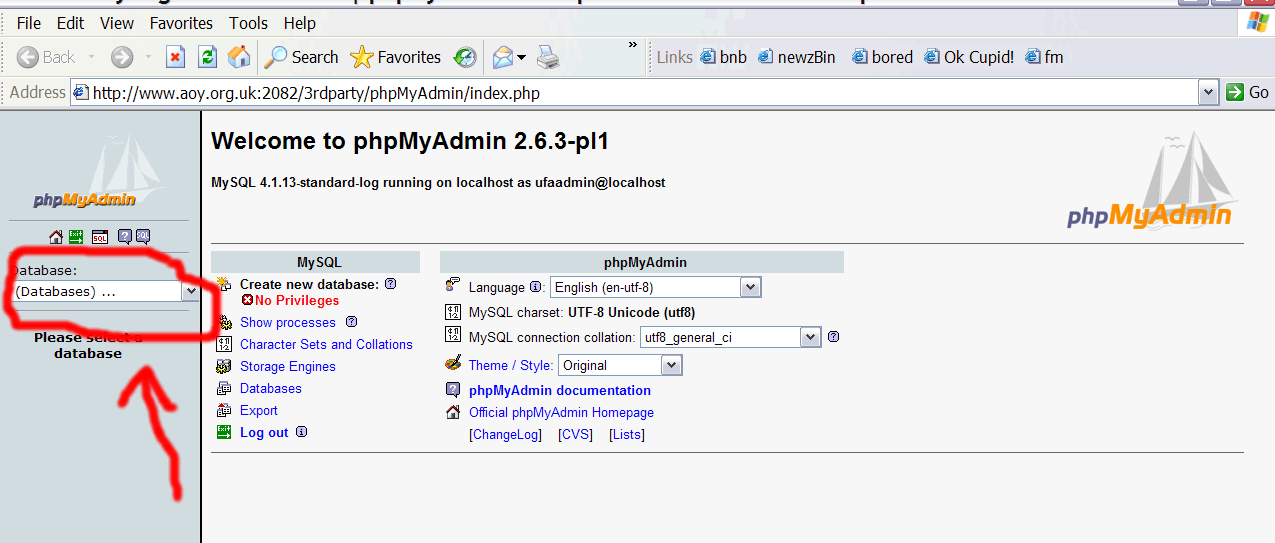
Oh, and I indeed do have phpadmin and the database still seems to be there.
Image
Mordib
King of Beggars
Posts: 673
Joined: 26 Oct 2004, 12:25
Location: Irn Bru

Post by Mordib »

nope the '//' means its a comment that gets ignored by the browser.

ok, well if you have all those correct then its a problem with the mysql (unless other files had been seriously changed). how do you manage the site, do you just use ftp to upload files and thats it or do you have a web interface where you can go and set up email accounts etc??? depending on the host and how much you pay you will have various tools. if you have none of these then you will have to rely on your hosts to check for you
Image
User avatar
thelostdragon
Bruce Lee's Fist
Posts: 7059
Joined: 29 Oct 2004, 22:36
Location: Basin City

Post by thelostdragon »

What I can do is upload files via my FTP client. I have a web interface for my MySQL database, but I decided not to play with it as I do not really understand what all the actions and options there are actually for.

I just sent my host the following email:
Hi there!

I contacted you earlier today and I just wanted to update you on what has happened so far.

It turned out that the guy has edited my config.php-file, located in www\includes\. I edited a virgin config.php-file with my user info and password, uploaded it, but the site still can’t connect to my MySQL database. I checked with PHPMyAdmin and the database is still there. Do you have access to my 'logs' directory in order to find out what exactly the guy has done to my website?

Thanks!
Image
Mordib
King of Beggars
Posts: 673
Joined: 26 Oct 2004, 12:25
Location: Irn Bru

Post by Mordib »

right the web interface for mysql is where you need to go, you dont need to change anything whilst your there, but it will list all of your databases, so you can check to see if yours is still there

Image
Image
User avatar
thelostdragon
Bruce Lee's Fist
Posts: 7059
Joined: 29 Oct 2004, 22:36
Location: Basin City

Post by thelostdragon »

Thanks. My database indeed is still there. A guy on the PostNuke-forum suggested, that I delete all my PostNuke-Stuff and re-upload it then. What do you think?

I mean the content of the website is still there as it is in the database.
Image
User avatar
thelostdragon
Bruce Lee's Fist
Posts: 7059
Joined: 29 Oct 2004, 22:36
Location: Basin City

Post by thelostdragon »

I'm currently deleting everything and upload the .761 version. I had .750 running. Theoratically, all the stuff should be there due to intact database.
Image
User avatar
thelostdragon
Bruce Lee's Fist
Posts: 7059
Joined: 29 Oct 2004, 22:36
Location: Basin City

Post by thelostdragon »

Thank God the database is still there. I backed it up now.

And on to my next problem... I removed all the .750 .php-files and uploaded .761. So I went to the .install.php-file, but it said it couldn't create the database, even when I checked "Create Database".

I went to PHPMyAdmin and backed up my database. I then deleted the online database and tried to install again. It wouldn't work. I always get this message: "Unable to make database"

I even tried to upgrade previously, but it would only let me chose to upgrade from .72 maximum. So I went for new installation which doesn't work.

D'oh!
Image
Mordib
King of Beggars
Posts: 673
Joined: 26 Oct 2004, 12:25
Location: Irn Bru

Post by Mordib »

right, so it looks like the mysql account details have been changed, are you able to create a database inside phpmyadmin? do you have an extra tab in it called something like 'permissions' or 'users' where you can add new people to the database acces?
Image
User avatar
thelostdragon
Bruce Lee's Fist
Posts: 7059
Joined: 29 Oct 2004, 22:36
Location: Basin City

Post by thelostdragon »

I thought so, too. However, I somehow managed to install a new site. If you go to my website, you'll see that it is a complete virgin PostNuke site.

I created a new database during installation as phpMyAdmin wouldn't let me upload the backup-file. It kept on telling me that the database 'thelostd' already existed. So I deleted the whole database. Now the site is up and the database has been created, I still can't upload my old database. Follow the link to see a screenshot of what is happening when I try to upload the backed-up database at phpMySQL.

Image

I can't see what's wrong in line one of my database. back-up. Can you? As you can see on the screenshot it just says "-- phpMyAdmin SQL Dump".
Image
Mordib
King of Beggars
Posts: 673
Joined: 26 Oct 2004, 12:25
Location: Irn Bru

Post by Mordib »

well, I cannot see whats wrong with your mysql dump either from that screen, if it were me at this point I would delete all the tables but not the database, then cut and paste a few tables at a time from the backup skipping the first few lines.

good luck :)
Image
Mordib
King of Beggars
Posts: 673
Joined: 26 Oct 2004, 12:25
Location: Irn Bru

Post by Mordib »

i mean from that screen shot the error is surely that it doesnt like trying to create a database inside a database... if you delete a table and then cut and paste the mysql from the backup... eg for an older version of BnB one table was:

Code: Select all

CREATE TABLE `phpbb_ranks` (
  `rank_id` smallint(5) unsigned NOT NULL auto_increment,
  `rank_title` varchar(50) NOT NULL default '',
  `rank_min` mediumint(8) NOT NULL default '0',
  `rank_special` tinyint(1) default '0',
  `rank_image` varchar(255) default NULL,
  PRIMARY KEY  (`rank_id`)
) ENGINE=MyISAM DEFAULT CHARSET=latin1 AUTO_INCREMENT=14 ;

-- 
-- Dumping data for table `phpbb_ranks`
-- 

INSERT INTO `phpbb_ranks` VALUES (3, 'Chuck Norris'' left eyebrow', 10, 0, '');
INSERT INTO `phpbb_ranks` VALUES (4, 'Member', 100, 0, '');
INSERT INTO `phpbb_ranks` VALUES (5, 'Senior Member', 500, 0, '');
INSERT INTO `phpbb_ranks` VALUES (6, 'Posting Freak', 1000, 0, '');
INSERT INTO `phpbb_ranks` VALUES (7, 'Super Administrator', 0, 1, '');
INSERT INTO `phpbb_ranks` VALUES (8, 'Administrator', 0, 1, '');
INSERT INTO `phpbb_ranks` VALUES (9, 'Super Moderator', 0, 1, '');
INSERT INTO `phpbb_ranks` VALUES (10, 'Moderator', 0, 1, '');
INSERT INTO `phpbb_ranks` VALUES (11, 'I do not have a life outside this forum...', 5000, 0, '');
INSERT INTO `phpbb_ranks` VALUES (12, 'The 1337 one!', 0, 1, NULL);
INSERT INTO `phpbb_ranks` VALUES (13, 'Jackie Chan''s little toe', 0, 0, '');
but it wouldnt work unles the table was deleted first...
Image
gojensen
King of Beggars
Posts: 603
Joined: 01 Nov 2004, 10:44
Location: Norway

Post by gojensen »

if you open the file in say notepad/wordpad/text editor... does it look "okay"? Specifically is there an ; at the end of the "Create Database" line? Because it doesn't look like it in the screenshot.

(you can ignore lines beginning with dashes -- they are comments)
So long, and thanks for all the fish!
User avatar
thelostdragon
Bruce Lee's Fist
Posts: 7059
Joined: 29 Oct 2004, 22:36
Location: Basin City

Post by thelostdragon »

Thanks so much for all your kind help. It helped me a lot so far.

I now deleted all the tables from my database (as my host wouldn't allow me to delete the database itself) and re-inserted all the tables from the backup database. Now, when going to my website which is now on .761, I get the following error message:

Fatal error: Call to a member function on a non-object in /export/home/thelostd/www/modules/Xanthia/pnuserapi.php on line 584
Does anybody know about this? Line 584 in this file says
$row = $result->GetRowAssoc(false);
Huh?
Image
User avatar
thelostdragon
Bruce Lee's Fist
Posts: 7059
Joined: 29 Oct 2004, 22:36
Location: Basin City

Post by thelostdragon »

OK, desperating again, lol! After the new installation of .761, I deleted all the tables from my SQL database that originally contained data, like the user names of my sites, comments and reviews.

Still the same error message. Argh...!
Fatal error: Call to a member function on a non-object in /export/home/thelostd/www/modules/Xanthia/pnuserapi.php on line 584
Last edited by thelostdragon on 13 Dec 2005, 21:11, edited 1 time in total.
Image