Oh if it annoys you in IE7 the address bar is stuck right at the top (it's a Vista thing) look here:
http://blogs.msdn.com/tonyschr/archive/ ... 21542.aspx
It works a treat and puts it back where it should be, under the menu and links bars (if you have them turned on). I still can't fathom why you'd want to turn links off.
By default the Links and Menu bars can be moved but the address bar cannot.
Internet Explorer 7.0 & Mozilla Firefox 2.0 RELEASED!
-
bradavon
- Bruce Lee's Fist
- Posts: 24430
- Joined: 27 Oct 2004, 20:30
The more I use FF2 the more I'm liking it and it's new features.
I've just discovered "Live Bookmarks". Which basically is an RSS Reader but it runs from your Bookmarks.
You go to a site such as DVD Times or DVD Active and click on the Orange RSS logo that appear in the address bar, subscribe and this adds a link to your Toolbar Bookmarks.
Click on this and a Real-time drop down menu appears of what's on the site. It's wonderfully.
I've just discovered "Live Bookmarks". Which basically is an RSS Reader but it runs from your Bookmarks.
You go to a site such as DVD Times or DVD Active and click on the Orange RSS logo that appear in the address bar, subscribe and this adds a link to your Toolbar Bookmarks.
Click on this and a Real-time drop down menu appears of what's on the site. It's wonderfully.
-
slasher13
- Royal Tramp
- Posts: 1799
- Joined: 03 Dec 2004, 09:15
- Contact:
That same feature was in Firefox build 1.0.7 I believe, I was using it at that time, but def agree with you, it is a great tool, I have gametrailers, dvdtime review and bbc on RSS reader bookmark. Its greatbradavon wrote:I've just discovered "Live Bookmarks". Which basically is an RSS Reader but it runs from your Bookmarks.

-
EvaUnit02
- Bruce Lee's Fist
- Posts: 9150
- Joined: 08 Feb 2005, 14:39
- Location: Wellywood, Kiwiland
- Contact:
Live Bookmarks have been around since like version 1.0 of Firefox, seriously you didn't notice it til now?
I just installed IE7 and this Vista design faggotry is pissing me off. WTF, the navigation bar is at the top of the window and unmovable? That reg hack to bring the menu bar works but now the fucking Google toolbar is above the navigation bar. I want it in between the the navigation bar and the tab bar like I have it in Firefox FFS.
What's more IE7 is really slow on my machine (P3 1.8ghz), Firefox is still is as fast as the wind.
I just installed IE7 and this Vista design faggotry is pissing me off. WTF, the navigation bar is at the top of the window and unmovable? That reg hack to bring the menu bar works but now the fucking Google toolbar is above the navigation bar. I want it in between the the navigation bar and the tab bar like I have it in Firefox FFS.
What's more IE7 is really slow on my machine (P3 1.8ghz), Firefox is still is as fast as the wind.
-
EvaUnit02
- Bruce Lee's Fist
- Posts: 9150
- Joined: 08 Feb 2005, 14:39
- Location: Wellywood, Kiwiland
- Contact:
-
bradavon
- Bruce Lee's Fist
- Posts: 24430
- Joined: 27 Oct 2004, 20:30
Why do you always sound shocked when you make such statements? I'm sure you miss things.EvaUnit02 wrote:Live Bookmarks have been around since like version 1.0 of Firefox, seriously you didn't notice it til now?
Do your homework (other tweaks too):EvaUnit02 wrote:I just installed IE7 and this Vista design faggotry is pissing me off. WTF, the navigation bar is at the top of the window and unmovable?
http://www.enhanceie.com/ie/tweaks.asp
Apparently it makes more sense in Vista.
You don't need a registry tweak (I'm sure MS put it in so not exactly a hack) just right click and turn menus back on, at first I put them on but have turned them back off as they're not really needed any more.EvaUnit02 wrote:That reg hack to bring the menu bar works but now the fucking Google toolbar is above the navigation bar.
I presume you mean address bar? If so that's it default state. If you mean:EvaUnit02 wrote:I want it in between the the navigation bar and the tab bar like I have it in Firefox FFS.
1. Menu Bar then
2. Address Bar then
3. Links Bar (why would you want to turn this off?)
3. Tabs Bar
Then that's how everyone wants it but MS seem to think otherwise and are forcing us to think otherwise.
I don't use shite like Google, AOL, Yahoo, MSN toolbars they just make a cluttered mess (Firefox has all the functionality they provide without an ugly toolbar).
You seriously run a Pentium 3 1.8Ghz? Upgrade dude no wonder it's slow.EvaUnit02 wrote:What's more IE7 is really slow on my machine (P3 1.8ghz), Firefox is still is as fast as the wind.
I ran XP Pro on a Pentium 3 333Mhz (admittedly slower) and boy it ran like a dog.
-
bradavon
- Bruce Lee's Fist
- Posts: 24430
- Joined: 27 Oct 2004, 20:30
Internet Explorer 7: Flawed or Misunderstood? This is worth a read:
http://www.winsupersite.com/showcase/ie ... rstood.asp
The user.js and prefs.js are useful files. I've extended the default length of the search box, tis to small.
http://www.winsupersite.com/showcase/ie ... rstood.asp
Nice one thanks. It uses the same dictionary so contrary to what I first thought doesn't offer any added bonus.EvaUnit02 wrote:Brad, if you want to disable the FF2.0's built-in spell checker altogether then add the following line to your user.js file in your Application Data/Mozilla/Firefox/Profiles/ profile:-
user_pref("layout.spellcheckDefault", 0);
The user.js and prefs.js are useful files. I've extended the default length of the search box, tis to small.
-
EvaUnit02
- Bruce Lee's Fist
- Posts: 9150
- Joined: 08 Feb 2005, 14:39
- Location: Wellywood, Kiwiland
- Contact:
Well duh.bradavon wrote:Apparently it makes more sense in Vista.
Sorry, I meant to say move the menu bar to the top. You know what I meant.You don't need a registry tweak (I'm sure MS put it in so not exactly a hack) just right click and turn menus back on, at first I put them on but have turned them back off as they're not really needed any more.
Navigation bar/address bar - been the same thing since Firefox came onto the scene.I presume you mean address bar?
Thanks again, Captain Obvious.Then that's how everyone wants it but MS seem to think otherwise and are forcing us to think otherwise.
I can't upgrade since it's not my computer, it's a work machine which is under a warranty - I've told you this a number of times before.You seriously run a Pentium 3 1.8Ghz? Upgrade dude no wonder it's slow.
I ran XP Pro on a Pentium 3 333Mhz (admittedly slower) and boy it ran like a dog.
-
bradavon
- Bruce Lee's Fist
- Posts: 24430
- Joined: 27 Oct 2004, 20:30
-
EvaUnit02
- Bruce Lee's Fist
- Posts: 9150
- Joined: 08 Feb 2005, 14:39
- Location: Wellywood, Kiwiland
- Contact:
Yes, I have. We both know that you have a dreadful memory, this has been proven time and time again.bradavon wrote:Nope I'm afraid you haven't.
Now that I've rebooted my machine IE7's speed is fine. It most've been bogged down earlier cuz I fooling around with getting FF1.5 extentions to work in 2.0 and the like.
BTW check-out Spellbound II.
-
bradavon
- Bruce Lee's Fist
- Posts: 24430
- Joined: 27 Oct 2004, 20:30

For some reason he based it on a VERY old build (the last official build though).EvaUnit02 wrote:BTW check-out Spellbound II.
I have a working build with Inline Spell Checking if anyone is interested. It's a bit much to call that version V2.
-
EvaUnit02
- Bruce Lee's Fist
- Posts: 9150
- Joined: 08 Feb 2005, 14:39
- Location: Wellywood, Kiwiland
- Contact:

-
bradavon
- Bruce Lee's Fist
- Posts: 24430
- Joined: 27 Oct 2004, 20:30
There's a neat (Tiny) add-in with no Adware or Toolbars that gives IE5 and above (so v7 too) Firefox "Find" functionality:
Once installed you press Ctrl-F to activate, it doesn't change the one on the menu (which incidentally without turning Menus back on how do you get to it?)
http://www.ieforge.com/InlineSearch/
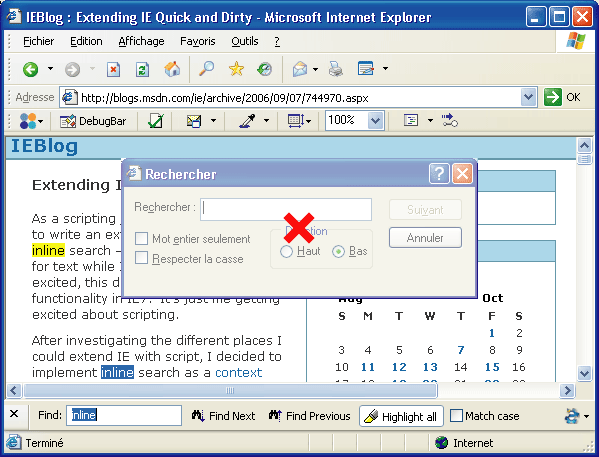
Once installed you press Ctrl-F to activate, it doesn't change the one on the menu (which incidentally without turning Menus back on how do you get to it?)
http://www.ieforge.com/InlineSearch/
-
bradavon
- Bruce Lee's Fist
- Posts: 24430
- Joined: 27 Oct 2004, 20:30
It seems:EvaUnit02 wrote:Brad, if you want to disable the FF2.0's built-in spell checker altogether then add the following line to your user.js file in your Application Data/Mozilla/Firefox/Profiles/ profile:-
user_pref("layout.spellcheckDefault", 0);
0 - Is off, the Spelling option in Options but nothing more, you still see it when right clicking.
1 - Is on
2 - Is on EDIT: BUT ALSO CHECK SEARCH FIELDS TOO!
Why you'd want to turn this off is beyond me???
There's another way of doing it here:thelostdragon wrote:Uninstalled it again and will wait until it works with the German browser.
http://www.lifehacker.com/software/fire ... 209941.php
-
bradavon
- Bruce Lee's Fist
- Posts: 24430
- Joined: 27 Oct 2004, 20:30
I've found these two wicked IE7 Search Engine Addin Sites:
* Decent list, easy to read: http://tredosoft.com/internet_explorer_ ... _providers
* 802 different ones, over 81 pages: http://www.opensearchlist.com/
I just went through all 81 pages
* Decent list, easy to read: http://tredosoft.com/internet_explorer_ ... _providers
* 802 different ones, over 81 pages: http://www.opensearchlist.com/
I just went through all 81 pages
-
grim_tales

- Bruce Lee's Fist
- Posts: 22163
- Joined: 25 Oct 2004, 18:34
- Location: St. Albans, UK

-
grim_tales
- Bruce Lee's Fist
- Posts: 22163
- Joined: 25 Oct 2004, 18:34
- Location: St. Albans, UK

-
slasher13
- Royal Tramp
- Posts: 1799
- Joined: 03 Dec 2004, 09:15
- Contact:
Just installed IE7 now, and surprised it uses antialiases Truetype fonts! Even Word can't do that! They look fantastic! This should practically eliminate the need to use images for text in web pages from an aesthetic point of view. Also IE7 has been really good to my PC, not even crashed out once, I like the way favourites are organised. Better than Firefox, although Firefox does seem to have more feature, am loving the cookieculler plugin 
IE7 has gone for the minimal look which is growing on me now...
IE7 has gone for the minimal look which is growing on me now...
-
grim_tales
- Bruce Lee's Fist
- Posts: 22163
- Joined: 25 Oct 2004, 18:34
- Location: St. Albans, UK
-
bradavon
- Bruce Lee's Fist
- Posts: 24430
- Joined: 27 Oct 2004, 20:30
Classicgrim_tales wrote:When I open IE7 I keep getting the message, "Internet Explorer is currently running with add-ons disabled. To turn on add-ons, close internet explorer and then start it again", so I close and re-open the window but it doesnt work
There are two icons on your Start Menu upon installation:
Normal
All Addins disabled - So you can troubleshoot
Guess which one you were clicking on
-
grim_tales
- Bruce Lee's Fist
- Posts: 22163
- Joined: 25 Oct 2004, 18:34
- Location: St. Albans, UK
-
tom2681
- Bruce Lee's Fist
- Posts: 5577
- Joined: 25 Oct 2004, 16:18
- Location: Where you'll never find me
-
grim_tales
- Bruce Lee's Fist
- Posts: 22163
- Joined: 25 Oct 2004, 18:34
- Location: St. Albans, UK
-
bradavon
- Bruce Lee's Fist
- Posts: 24430
- Joined: 27 Oct 2004, 20:30
That is interesting.slasher13 wrote:Just installed IE7 now, and surprised it uses antialiases Truetype fonts! Even Word can't do that! They look fantastic! This should practically eliminate the need to use images for text in web pages from an aesthetic point of view.
I don't, in some silly bar on the left. RSS Syndication is REALLY poorly implemented. By the time I've clicked on the RSS Feed and looked at the "Plain text" view I may as well have gone to the site.slasher13 wrote:Also IE7 has been really good to my PC, not even crashed out once, I like the way favourites are organised.
This for me is why FF is still leaps ahead of IE. All the good ideas in IE7 were nicked from FF, nothing wrong with that but then as it doesn't support extensions the coolness and features then shop. FF can go on forever. It also natively has lots of little things to make it better.slasher13 wrote:although Firefox does seem to have more feature, am loving the cookieculler plugin
I am pleased IE7 is out though, as IE6 is reminds me of using Windows 3.1 (no seriously it does) and I hate having to use it at friends house and work. I've not installed IE7 at work (FF2 is on though) as the vast majority of the end-users are on Windows 2000 so for web design it just adds another level of complications.
Plus I barely use IE anyway.
On the one hand it's good BUT having the Back/Forward on one side and Stop/Refresh on the other is dreadfully badly thought out.slasher13 wrote:IE7 has gone for the minimal look which is growing on me now...